

Quoting software is easy to forget about. You get the form live, it ticks along in the background, and unless you go looking, you’ve no real idea whether it’s earning its keep. A job comes in, a job goes out, and the tool sitting quietly between the two rarely asks for your attention.
Mostly that’s a good thing. But it also means the useful nudge never comes, a lead sits unanswered for a week, and the genuinely powerful feature you never found stays unfound.
This batch of updates is aimed squarely at that. Less “here are your numbers, good luck”, more “here’s what’s working, and here’s the one thing worth doing right now”.
A dashboard that tells you what to do next
Log in and, instead of a wall of figures, you get a straight answer to the only two questions that matter: is this working, and what should I do about it?
The home screen now greets you and puts your numbers where you can actually read them: views, leads and conversion, each with a live trend line so you can see which way things are heading, not just today’s total.
Underneath sits a next best action — the single most useful thing to do right now. “You’ve got 3 leads waiting on a reply.” “Your form’s live but nobody’s seen it yet, here’s how to share it.” It’s the difference between staring at a chart and knowing your next move. And it changes as you do: clear the replies and it points you at the next useful thing, whether that’s getting the form in front of more people or tightening a question that’s losing them.
And because plenty of people never stumble on the powerful bits, the dashboard now points them out as you go:
- Conditional logic to branch the form so each customer only sees what’s relevant
- Landing pages if you haven’t got a website to embed on
- Webhooks to push every lead into Zapier, Make or your own CRM
- A thank-you redirect to send customers somewhere useful the moment they submit
Small prompts, surfaced when they’re actually relevant, rather than a features list you have to go hunting through.
A weekly email so nothing slips
You shouldn’t have to log in for Quotify to keep working. So once a week, it comes to you.
There’s a new weekly summary: your views, new leads and any bookings for the week, plus a clear list of any leads still waiting on a reply. It’s a two-minute read that tells you whether the week was busy or quiet and, more to the point, whether anyone’s waiting on you. That unanswered enquiry from Tuesday doesn’t get to quietly become next month’s lost job.
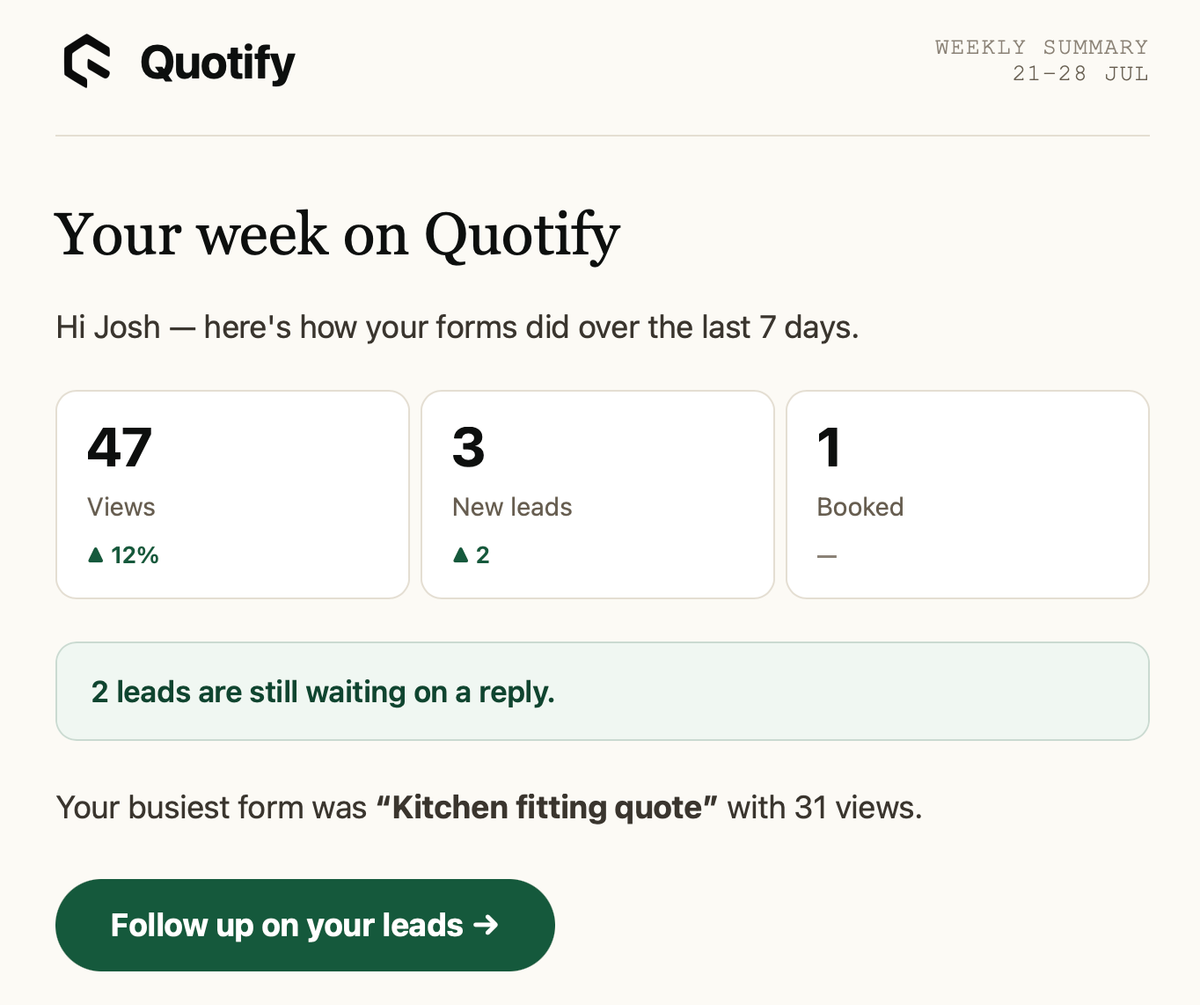
If it’s been a slow week, it won’t just show you a row of zeros and leave you feeling flat. It nudges you on how to get your form in front of more people instead. And if the weekly check-in isn’t for you, it’s one click to turn off.
Clearer plans, and an option for busier teams
We’ve also tidied the plans so it’s obvious what you get on each, and added an Enterprise option for higher-volume teams that have outgrown the standard tiers. That one’s a conversation rather than a checkout, so if it sounds like you, get in touch.
Have a look
None of this needs setting up. Log in and the new dashboard is already there, showing you where you stand and what to do next. The weekly email starts landing on its own.
And if you haven’t built your first form yet, there’s never been a quicker time to start.