

We’re excited to share that Landing Pages are almost ready! This new feature has been designed to make it even easier to turn your pricing forms into focused, conversion-ready pages without needing to build or host a separate website.
Over the past few months we’ve been working behind the scenes to develop a simple way for users to create dedicated landing pages for their forms. The goal is straightforward: give you a fast, professional way to present your pricing tools and capture high-intent enquiries.
Why Landing Pages?
While pricing forms are incredibly powerful on their own, they perform even better when they live inside a page designed specifically to convert visitors. And not everyone has (or needs) a website.
With our new landing pages, you’ll be able to:
- Create dedicated pages for individual services or campaigns
- Add branding elements such as logos and hero images
- Link a specific quote form to each page
- Share a clean, focused URL with prospects
- Capture higher-quality enquiries from visitors who already understand your pricing
Instead of embedding forms across multiple websites or sending prospects generic links, you’ll have a purpose-built page designed around your quoting experience.
Built for simplicity
One of the biggest goals with this feature is to keep everything simple and fast.
Inside your dashboard you’ll be able to:
- Create a new landing page
- Upload a hero image and company logo
- Select which quote form should appear on the page
- Set the page to Draft or Published
- Save and share the link
No coding. No design tools. No external hosting.
Just a clean landing page that showcases your pricing tool.
Perfect for marketing campaigns
Landing pages are particularly useful if you’re running:
- Google Ads campaigns
- Paid social adverts
- Email campaigns
- Trade show follow-ups
- Product or service launches
Instead of directing traffic to your main website, you can send visitors to a focused page that leads directly into your quote form.
This reduces distractions and helps convert visitors into enquiries much faster.
Designed to work with your forms
Every landing page connects directly to a form you’ve already created in Quotify.
This means you can create multiple landing pages for different purposes, each linked to a specific form.
For example:
- A “Website Design Quote” landing page
- A “Solar Installation Estimator” page
- A “Kitchen Renovation Cost Calculator” page
Each page can guide visitors straight into the pricing tool that’s most relevant to them.
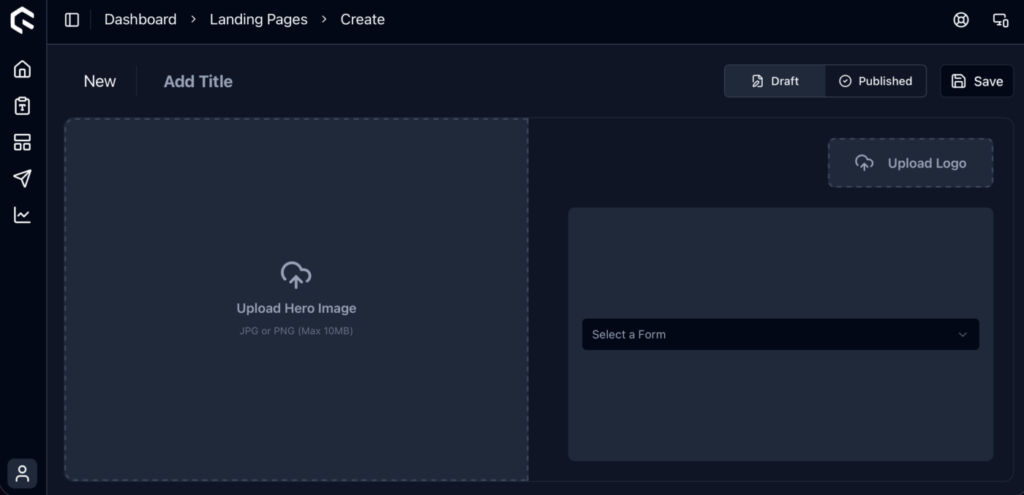
Our landing page builder - dark mode
What’s next?
Landing pages are almost ready to be shipped. We’re refining the editor, improving the upload experience for branding assets, and testing the publishing workflow.
Over the coming weeks we’ll be rolling this feature out to users so you can start creating landing pages directly from your dashboard.
We’re really excited about the possibilities this opens up, especially for businesses using Quotify as part of their lead generation strategy.
Stay tuned
We’ll be sharing more updates soon, including:
- How to publish your first landing page
- Examples of how businesses are using Quotify landing pages
If you’re already using Quotify to generate quotes and enquiries, landing pages will give you another powerful way to turn interested visitors into qualified leads.
More updates coming soon 👀