

If you’ve ever tried to cram every question into a single form, you’ll know what usually happens: people get overwhelmed, lose interest, and drop off.
That’s exactly why we’ve added our Multi-Step feature to Quotify, a simple but powerful upgrade that makes quoting and estimating smoother for your customers and far more effective for your business.
Multi-step forms break your quote/estimate journey into clear, easy-to-follow stages. Instead of staring at one long form, users move through it in logical steps, giving you better quality answers and dramatically improving completion rates.
Why multi-step makes such a difference
1. It feels effortless for your customers
Nobody enjoys scrolling through 20 questions in one go. Splitting your form into steps makes the process feel lighter and more achievable, even if the total number of questions stays the same.
2. Higher conversion rates
Short, manageable chunks keep customers engaged. They don’t feel like they’ve hit a wall, so they’re far more likely to submit the full quote.
3. Cleaner data, fewer mistakes
You can group related questions together, project details, measurements, preferences, budget, contact info. This creates a guided flow that helps people understand why you’re asking for certain details, and you get more accurate submissions as a result.
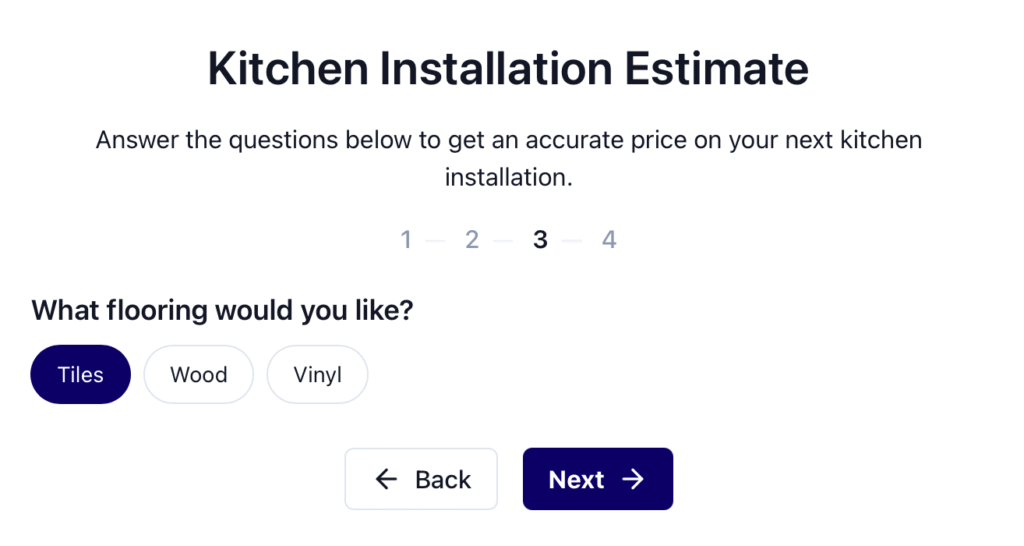
Example of the multi-step estimator in Quotify.
Built for real-world quote & estimate journeys
Multi-Step forms work seamlessly with everything you already use in Quotify. And even better, you can reorder steps just as easily as individual fields. No coding, no faff.
Perfect for any industry
This upgrade suits pretty much any business that provides dynamic quotes & estimates:
- Trades & home improvements
- Landscaping
- Vehicle services
- Construction
- Creative services
- Events
- Manufacturing
- Bespoke product builders
If your customers need to give you information before you can give them a price, multi-step forms will make that process smoother.
Start using multi-step forms today
The feature is available now in Quotify. Simply open your form in the editor, add a new step, and start organising your quote journey the way it should be.
If you’d like help setting up your first multi-step form or want to see what’s possible, just drop us a message, we’re always happy to help.