

Someone wrote in last week asking if Quotify could price by the perimeter of a thing rather than its area. They quote screen-edging work — protective trim around large displays — and the existing Area (W × H) field was the right shape but the wrong sum. They needed 2 × (width + height), not width × height.
Fair point. So Perimeter is now a field type, sitting next to Area in the form builder.
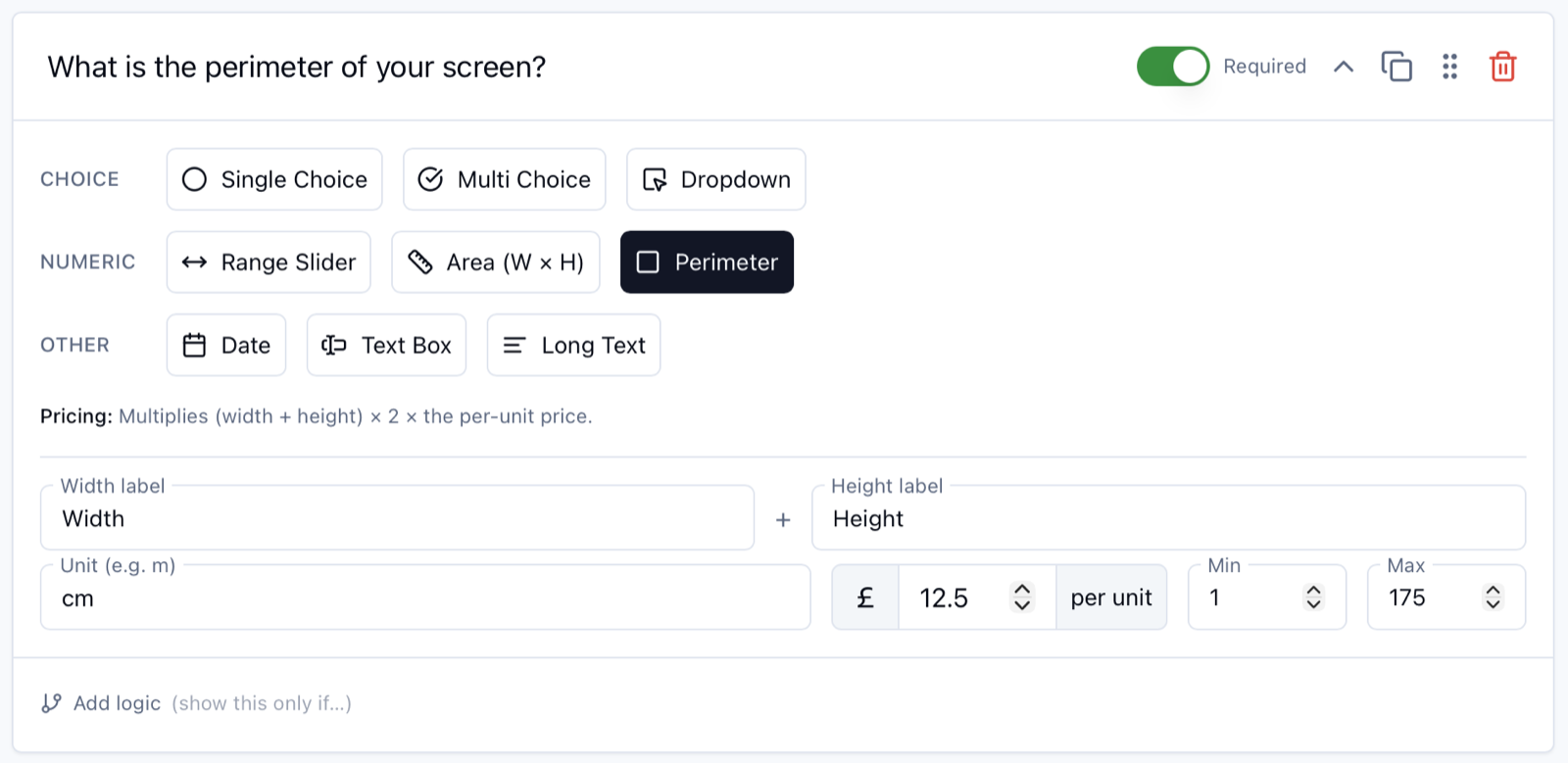
What it does
Same UX as Area: your customer enters a width and a height in whatever unit you’ve set (metres, feet, centimetres, inches, whatever). Quotify computes the perimeter, (width + height) × 2, and multiplies by your per-unit price.
So a 1200mm × 800mm screen at £12.50 per metre comes out as (1.2 + 0.8) × 2 × £12.50 = £50, calculated as the customer types, no maths on their end.
The familiar bits all carry over from Area:
- Width and Height labels: rename them to suit (“Length”, “Drop”, “Run”, whatever fits the job)
- Unit: m / cm / ft / in / whatever
- Per-unit price: what you charge per linear unit
- Min and Max: to stop someone fat-fingering 175 metres when they meant 1.75
When you’d reach for it
Anything priced by the linear edge of an object:
- Trades: fencing, gutter runs, skirting boards, cornice, dado rail, weatherstripping, edge-banding
- Glaziers and screen installers: protective trim, frame, gasket runs
- Signage and print: banner hemming, vinyl edge sealing
- Landscaping: kerbing, edging stones, garden borders, ribbon paths
- Upholstery and soft furnishings: piping, trim, edging tape
- Engineering and fabrication: anything where you charge per metre of weld, seal or finished edge
If you’ve been quoting any of those by making the customer multiply in their head (or worse, sending the form to someone who genuinely can’t be bothered to) Perimeter is the field you’ve been missing.
How to add one
Open any form in Quotify, drop a new question, and pick Perimeter from the Numeric row. Set your width/height labels, your unit, and your per-unit price. Save. Done.
The price preview on your form will update live as the customer enters dimensions, same as every other priced field. Submitted quotes carry through the computed total, the dimensions, and the per-unit rate, so when the lead lands in your inbox you’ve got the maths and the inputs that produced it.
Asked, shipped
This one’s a credit to the customer who flagged it. The bit of Quotify I’m proudest of isn’t any individual feature. It’s that the gap between “this would be useful” and the thing existing in the product is rarely more than a couple of weeks. If you’ve got something you wish Quotify did, tell me about it. The product roadmap is genuinely shaped by what people in the inbox actually need.
Full field-type reference (with the new Perimeter entry) lives in the KB: Field types explained.