

Not everything you charge for is a flat fee.
The weekend callout, the rush turnaround, the premium finish the customer talked themselves into: those are usually a percentage on top of the job, not a tidy round number you’ve pulled from the air. Trades do it, caterers do it, creatives do it. It’s how service pricing actually works.
Until now, Quotify only added fixed amounts. So if your rush rate was “plus 15%”, you had two choices: guess a pound figure and hope it landed close, or quietly forget the surcharge and swallow the cost. Neither is ideal when the whole point of an instant quote is that it’s accurate.
So we’ve added percentages.
Flip the £ to a %
Every pricing option now has a small £ / % toggle beside its price box. Leave it on £ for a fixed amount, or flip it to % and type a number. That’s the setup. Nothing to work out, nothing to keep updating every time your day rate changes.
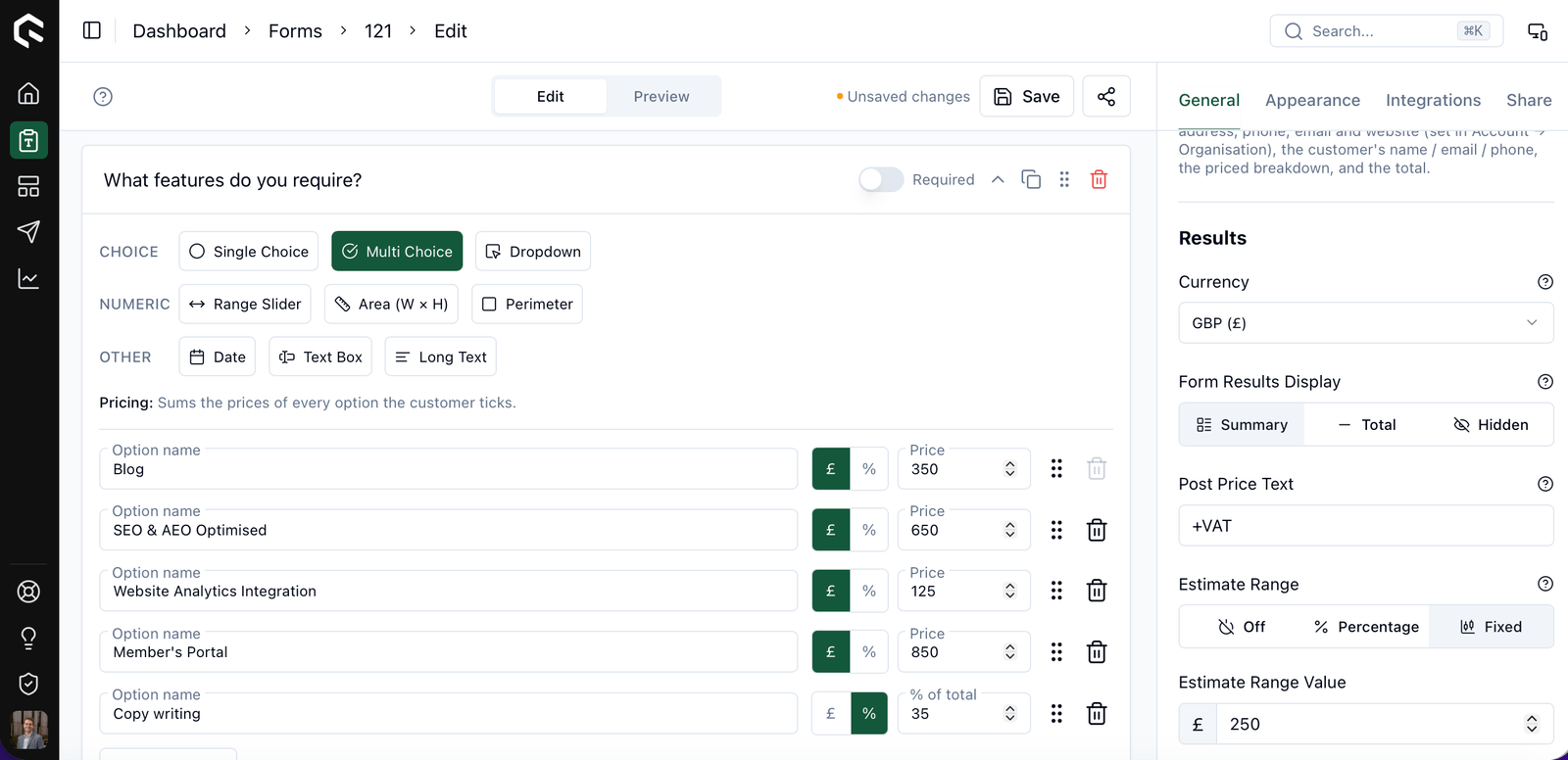
On the live form, when a customer selects that option, Quotify works out the percentage of everything else they’ve chosen and drops it in as a normal line item with the pound amount already calculated. Here’s the nice part: the customer never sees the percentage. You think in percentages behind the scenes; they just get a clean, labelled quote.
Say you set a weekend rate at +15% on a £300 job. This is what the customer sees:
- Base quote: £300
- Weekend rate: £45
- Total: £345
No percentage on show, no mental arithmetic, no need to advertise your markup. Just a tidy £345 with the weekend rate itemised, which is exactly what a customer wants to see. And no awkward “oh, and there’s a bit extra for the weekend” conversation, because it’s already baked into the number they were given.
They stack the sensible way
Add more than one and the maths behaves itself. A 10% surcharge and a 20% surcharge come to +30% of the base, not 20% of a figure that already had 10% baked in. Additive, not compounding, so nobody’s doing algebra at invoice time.
Where it earns its keep
Percentages turn up all over service pricing:
- Rush or short-notice work
- Weekend and out-of-hours rates
- Premium materials or a higher-spec finish
- Seasonal or peak-period markups
- Bulk discounts (put a minus in front and the same thing runs in reverse)
One thing worth knowing: this applies to the options a customer picks, so radio buttons, checkboxes and dropdowns. Area and range fields still price the way they always have. It’s the choices that can carry a percentage, not the measurements.
Price the way you actually price
If your real-world pricing has a “plus a bit for X” in it, your online quotes can finally say so, down to the penny, instead of you hard-coding a guess and hoping.
Flip a toggle and it’s done.
Build a form free and add your first percentage in a couple of minutes. If you’re already fine-tuning your numbers, here’s how Quotify’s pricing logic fits together.